How to Ask for Dating Profile Photo Feedback You Can Use
Turn opinions about your photos into specific decisions about the whole lineup.
Ask what a dating photo makes someone think about you, then ask what in the picture creates that impression. That's how “I like this one” becomes advice you can use. Show the full lineup too, because a photo's value depends on what the other pictures already say. If you need more options first, search your camera roll for overlooked moments.


Give the comparison a purpose
Chris's wedding-speech photo and dog photo invite different reactions. The microphone, notes and guests give him a visible role at the occasion. That can communicate Status. The close interaction with the dog adds warmth and Charm.
“Which is better?” leaves the reviewer to invent the assignment. They might choose the suit because they like formal clothes or the dog because they love animals. Neither answer tells you what the profile needs.
Try a more useful question: “My other photos already show me dressed up. Which of these adds a side of me you haven't seen?” If the answer is the dog photo, ask what makes it feel different. You now have a reason for the choice that applies to the lineup.
You can also ask which one they would remove and what would be lost. If removing the speech picture leaves no sign of a role or achievement, that matters. If several other pictures already establish that side, the warmer moment may contribute more. The answer should explain a tradeoff you can actually evaluate.
Let them look before you explain the story
Show the photos in their proposed order at phone size. Give the reviewer a moment to look, then ask what they think you enjoy and what spending time with you might be like. Let their first response stand before explaining where you were or why you love a particular photo.
A friend may remember the whole weekend behind an image. Someone seeing your dating profile won't have that memory. If the photo only becomes interesting after a long explanation, find a frame that carries more of the story or add a short, useful detail in your profile text.
Ask a friend who knows you whether the pictures still look like you and reflect your life. For the impression itself, choose someone willing to explain their dating preferences and give a direct answer. Their taste is one perspective. Use the reasoning to make your choice instead of treating their favorite as a universal winner.
Follow the reaction to a useful change
- Ask what comes across
“What would you expect spending time with me to be like?”
- Ask what creates it
“Which photo or detail made you think that?”
- Choose one change
“What would you replace, and what should the replacement add?”
Keep the explanation attached to the recommendation. It tells you whether the advice fits your goal.
Separate a visible problem from a personal preference

MJ's ski photo makes the setting and his expression readable. Imagine two responses to it: “I don't enjoy skiing” and “I couldn't recognize you in this picture.” Those comments ask for different decisions.
The first is a preference about the activity. If skiing matters to you, showing it can still be useful. The second is a usability concern worth checking in the actual lineup. Ask which part caused the confusion and whether the other photos establish who you are.
Likewise, “I prefer a closer crop” is incomplete advice. Ask what the closer view would improve and what it would cut away. Here, the pole and snowy setting help explain the outing. A crop that preserves both the person and the activity deserves a different assessment from one that removes the whole scene.
Write the observation in plain language: “My face is hard to connect to the earlier pictures,” or “This repeats the outdoor interest already shown.” Those notes give you an editing task. “Bad photo” doesn't.
Ask about identification before cutting out your friends
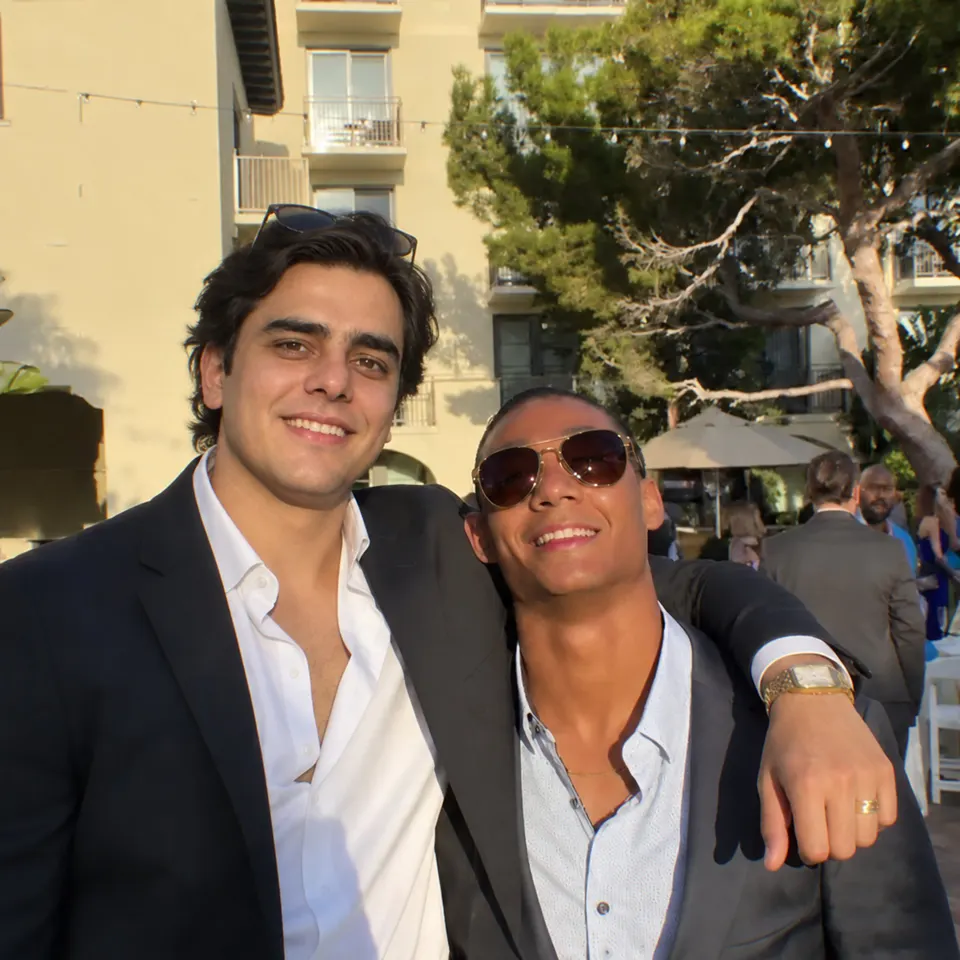
Zain's arm around his friend is part of this picture's appeal. Their smiles and close stance show connection. If someone says “use a solo photo,” find out whether they couldn't identify Zain or simply prefer pictures with one person.
A useful reviewer can point to the actual difficulty. Maybe the surrounding photos don't make the profile owner recognizable. Maybe another frame makes him more prominent while preserving the friend. Those are specific things to compare before removing the interaction that supports Popularity.
Ask the reviewer to describe what's gained and lost in their suggested change. That keeps the conversation focused on the dating impression, rather than treating every crop or technically cleaner image as an automatic improvement. The cropping guide works through that choice with visual examples.
Use this short request for your next review
“Could you look through these in order before I explain them? Tell me what kind of time you'd expect to have with me, which photo gives you the strongest reason to be interested, and where the lineup feels repetitive or unclear. If you'd swap one photo, what should the replacement show?”
That request gives the reviewer a manageable job. After their answer, ask for the visible detail behind any vague label. If they call a photo “confident,” is it your posture, your expression or a clear role in the scene? If they call it “boring,” does it repeat another picture or fail to show anything happening?
When two people disagree, compare their reasons. One might favor warmth while the other favors an active lifestyle. Your profile can contain both. If they both identify the same confusing crop or repeated scene, that gives you a concrete candidate to revise.
Photomaxxer evaluates photos and whole profiles across Face, Height, Physique, Money, Ruggedness, Status, Popularity, Charm and Humor. Use that feedback to examine the impressions your lineup creates alongside the specific observations from your review. You don't need equal coverage or the maximum score on every trait.
Finish by choosing one clear edit: replace a repeated portrait, restore useful context or capture a missing interaction. Then look at the full profile again. The review has done its job when you can explain why the new lineup introduces you better. The photo-order guide helps with that final read-through.