Dating Profile Photo Order: What Comes After Your First Picture?
Give each swipe a reason.
Start your dating profile with a strong, appealing moment. Then make the next photo answer a different question about you. A good order keeps adding reasons to be interested while making it easy to follow the same person through different settings.
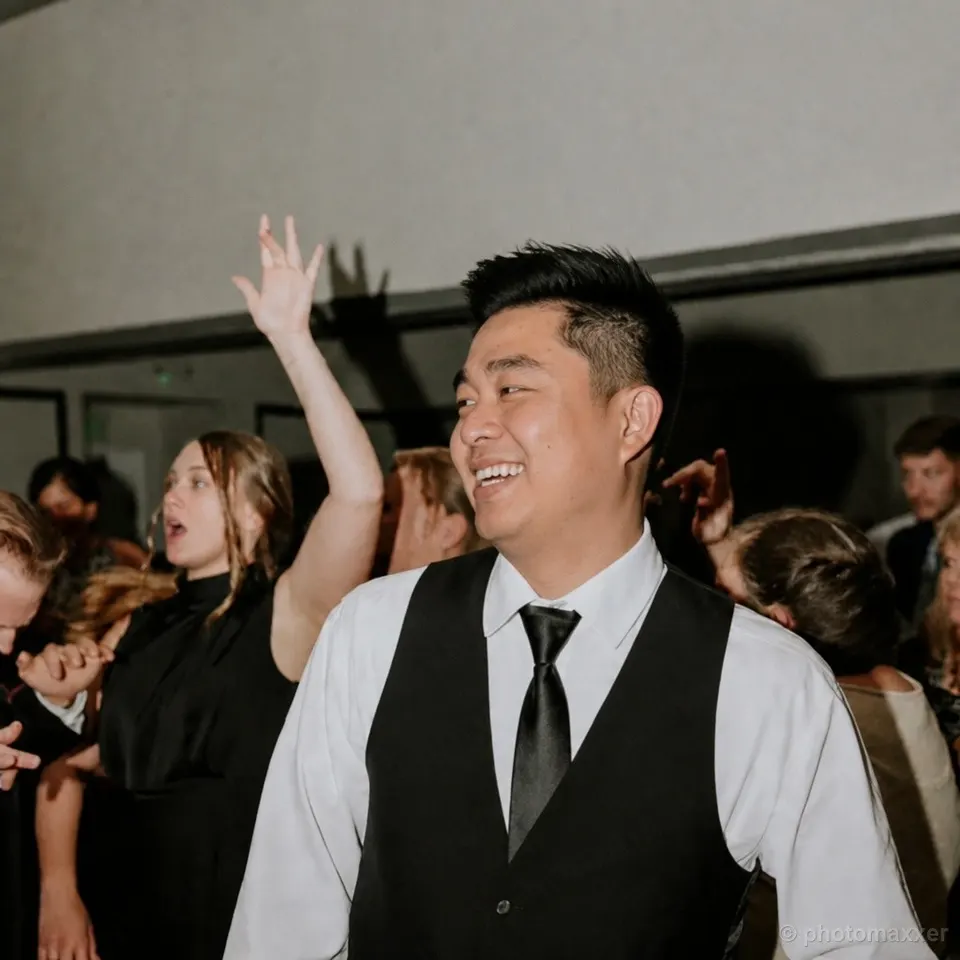

Make the second photo change the scene
Jason's dance-floor picture gives you a smile, a dressed-up occasion and people enjoying themselves around him. The wakesurfing photo takes the profile somewhere different: he's balancing on a board, with the water and wake showing the activity. Together, they introduce social energy and physical capability.
Starting with the dance floor makes warmth and company the opening impression. Putting wakesurfing next adds an active side before the profile starts to feel like a collection from one party. The order has a reason beyond putting the sharpest image first.
You could reverse them if you want the opening to center on an outdoor activity. The dance-floor photo would then add company and expression. Choose the opening that best introduces the life you want to share, then ask what the viewer should learn next. Our first-picture guide covers that initial choice.
Use the middle to add warmth

After the party and the water, this closer dog photo changes the pace. Jason is involved in an affectionate interaction in an ordinary indoor setting. That adds Charm and makes the profile feel less like a highlight reel of big occasions.
The contrast matters more than a fixed rule that a dog must go third. If your opener already shows a warm moment with a pet, your next picture might be the active one. If two early photos are both distant, a closer interaction can help someone connect the activity to the person.
Look for a change in what the photo communicates, not just a different background color. A second formal portrait might be taken in another country and still repeat the same impression. A casual picture with a dog can add more because the relationship and mood change.
Try an order with a clear reason for each move
Here's a suggested sequence for four photos from Jason's example profile. It's an editing exercise using those particular pictures, not a universal four-photo template.
One possible path through the photos
- 1. Dance floor
Open with a warm expression and a social occasion.
- 2. Wakesurfing
Change the scene and show capability in action.
- 3. With the dog
Bring the viewer closer with an affectionate moment.
- 4. Snowboard outing
Add a winter interest after the person is established.
The sequence moves from company to activity to warmth, then adds another interest. Each move has a job.
Put harder-to-recognize activity photos in context

The board and slope make the winter activity clear, but the goggles and face covering hide Jason's face. This photo contributes more once other pictures have introduced him. Moving it later gives it a supporting role instead of asking it to establish his appearance.
Ordering doesn't make a hidden face visible. You still need other photos that show enough of you. Likewise, moving a crowded group shot behind a solo picture won't resolve a genuinely confusing scene. If people can't work out which person is you, choose a more useful group moment. The group-photo guide shows what to look for.
The winter photo also follows a water sport, so both outdoor interests appear in the sequence. Keeping the dog photo between them creates a change of mood. If you want outdoor life to dominate, you could keep the activity pictures together. Make that emphasis a choice instead of an accident of camera-roll order.
Don't save a weak photo for the end
Your last picture still belongs to the introduction. It can offer a hobby, a playful moment or a detail someone could ask about. It shouldn't be a leftover that you wouldn't otherwise use.
Review the tail of the lineup as carefully as the opening. If three similar pictures are clustered there, keep the strongest and find something that adds a different side. Reordering cannot rescue repetition. Our photo-count guide helps you decide whether a picture needs replacing or leaving out.
Finally, look through the actual profile at phone size. Ask a friend to describe what they learn as each photo appears. The photo-feedback guide gives you questions that turn their reactions into useful changes. If their answers repeat, change the next image. If they lose track of who you are, improve the transition or replace the confusing picture. A useful order makes your life easier to understand, one photo at a time.