Should You Blur Other Faces in Dating Profile Photos?
Solve the actual problem while keeping the social moment.
Don't blur everyone else's face just to make a group dating photo about you. First decide what you're trying to fix. If it's hard to tell which person you are, choose a clearer frame. If someone doesn't want to appear, use a different photo or a version they're comfortable with. A row of covered faces can remove the connection that made the picture worth keeping.
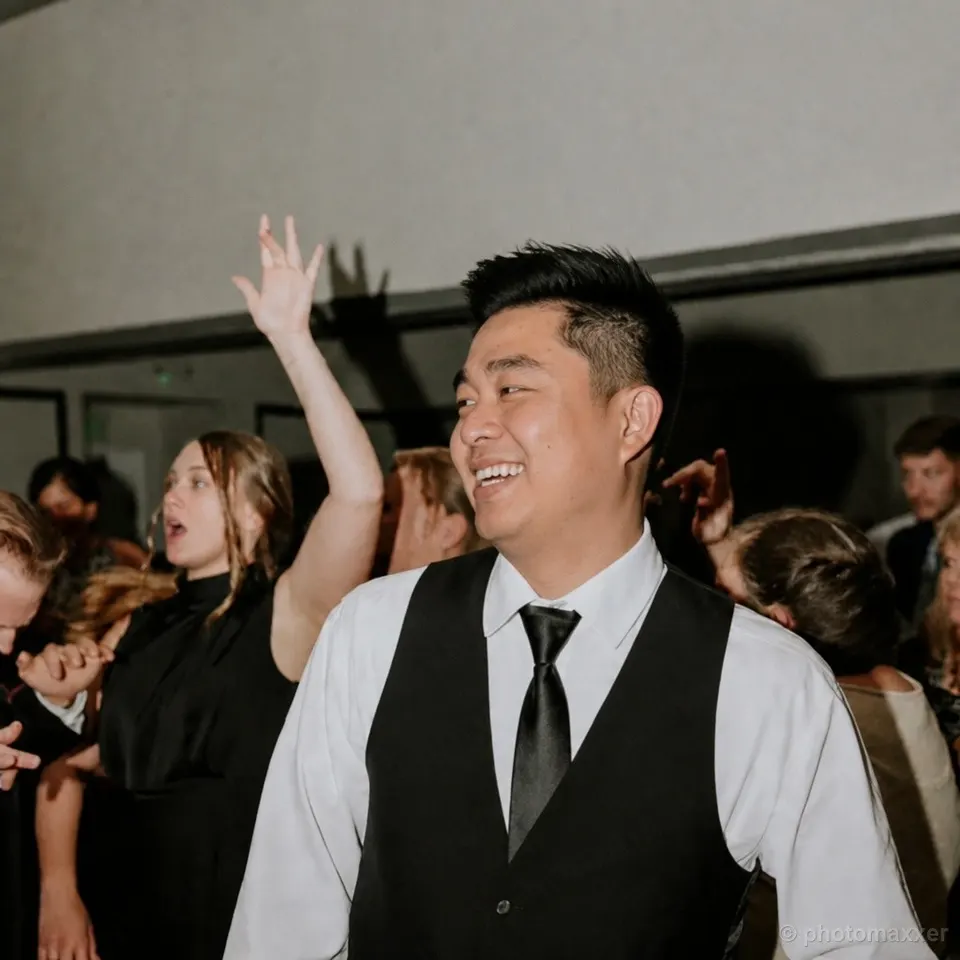
Ask whether the photo already makes you easy to find
Jason's party photo has plenty of people in it, yet he has a clear place in the frame. He's prominent, his smile is visible and the guests supply the energy around him. Covering their faces wouldn't be necessary to explain who to look at. It would add new shapes where there are currently people enjoying the occasion.
Use that distinction when reviewing your own group shot. Look at it at phone size, alongside the rest of your profile. If someone can identify you and understand the moment, other visible faces aren't automatically a problem. Keep the social information that gives the picture its appeal.
If a friend keeps mistaking someone else for you, take that feedback seriously. Another frame with a clearer position or expression can solve the problem before you reach for blur, arrows or labels. The group-photo guide covers choosing a picture where you're visibly involved.
Separate identification from someone else's preference
“I want viewers to notice me” and “my friend doesn't want to be on my profile” need different answers. The first is a composition problem. The second starts with what your friend is comfortable sharing.
Ask directly: “Are you okay with me using this on my dating profile?” If the answer is no, don't assume a little blur settles it. Choose another picture, or agree on a version before using it. You don't have to negotiate a complicated edit when there's a different frame available.
A crop can work when the person is at the edge and the remaining photo still makes sense. It works less well when your arm, gaze or pose clearly points toward the person you've removed. Review the whole moment afterward, not just whether a face is gone.
What are you trying to fix?
- Name the reason
Is it hard to identify you, a sharing preference or an unrelated distraction?
- Choose the frame
Keep the scene, reframe it or use another photo that solves that problem.
- Check the result
Can you still read the expression, activity and connection?
The edit should solve a real problem without removing the reason to keep the photo.
Don't turn a shared activity into a row of blank faces

MJ's paintball picture shows a shared activity. The equipment explains the outing, and the other players make it a group moment. Covering both companions' faces with oversized emojis would make those symbols compete with the gear and expressions. It wouldn't make MJ look more involved.
For a photo like this, establish which person you are elsewhere in the lineup if needed. Then let the activity shot add something different. If the people and equipment are too small to read, look for a closer frame from the same outing instead of decorating the existing one.
Engaged interaction can convey Popularity because it shows how you relate to other people. Faces and reactions are part of that information. A shared laugh loses something when the person laughing with you becomes a sticker.
That doesn't mean every companion needs to be fully visible. A shoulder, gesture or partial view can still explain an interaction. Judge the finished frame by whether the connection makes sense, rather than demanding either every face or no faces.
Background softness is different from covering selected people

Chris's toast photo shows the difference. He's the clear subject, while the guests behind him are softer. They still read as an audience. The picture keeps his role, the occasion and the people listening without making every face equally prominent.
That's a useful look to notice when choosing between existing photos. It doesn't mean you need to add maximum background blur to every group shot. If a nearby person's smile or gesture explains your own reaction, softening it away can weaken the scene. The editing guide explains how to judge an adjustment by what it helps you see.
A clearer role can also solve the “which one is you?” problem. The microphone and notes draw attention to Chris's part in the occasion. That role can suggest responsibility or Status; the mere presence of a crowd doesn't establish it.
If you cover a face, judge the result as a new photo
Keep an untouched copy. After any agreed edit, zoom back out and review the picture at phone size. Has the covered area become the first thing you notice? Does a missing expression make a shared moment harder to understand? Are there awkward fragments at the edge?
If the answer is yes, try a different frame. You don't owe the edited version a profile slot because it took time. A simpler photo from the same day may preserve your expression and the occasion with less work. For a crop, check the hands, shoulders and useful context using the cropping guide.
Keep the group photo when it adds enjoyable company, a shared interest or a visible role. Leave it out when making it usable strips away those qualities. Your profile can still feel social without a conventional group shot; the guide to profiles without group photos gives other ways to build that impression.