How to Take Better Photos of Yourself for Dating Apps
Better moments make better photos.
Take better dating photos by choosing better moments to photograph. A wedding where you are enjoying yourself, a day on the water, or a night out with friends tells a person much more than another carefully lit headshot. Start with what the picture says about your life. Camera settings come afterward.
For a practical comparison of staying in the action and pausing toward the camera, see our candid versus posed photo guide.
Choose the moment before the camera angle.
1. Decide what the photo should communicate
Before taking out the phone, finish this sentence: “This picture shows that I am…” Choose a useful impression, such as social, adventurous, stylish, physically capable, charming, or fun to be around. Then find a real situation that communicates it.
| Impression | A moment to capture | Keep in the frame |
|---|---|---|
| Popularity | Laughing with friends at a wedding or party | The people and interaction around you |
| Ruggedness | Skiing, hiking, or finishing a race | Enough of the activity to understand it |
| Status | Speaking at an event or attending a great occasion | The role you play and the access you have |
| Charm | A relaxed exchange over dinner | Your expression and the atmosphere |
| Money | A boat party, a beach-house weekend, or a good dinner out | The setting, the clothes, and a life someone would want to join |
You do not need to manufacture a spectacular event every week. A lively barbecue with friends is stronger material than an expensive backdrop where you look disconnected from everything around you.
The moment carries the message.
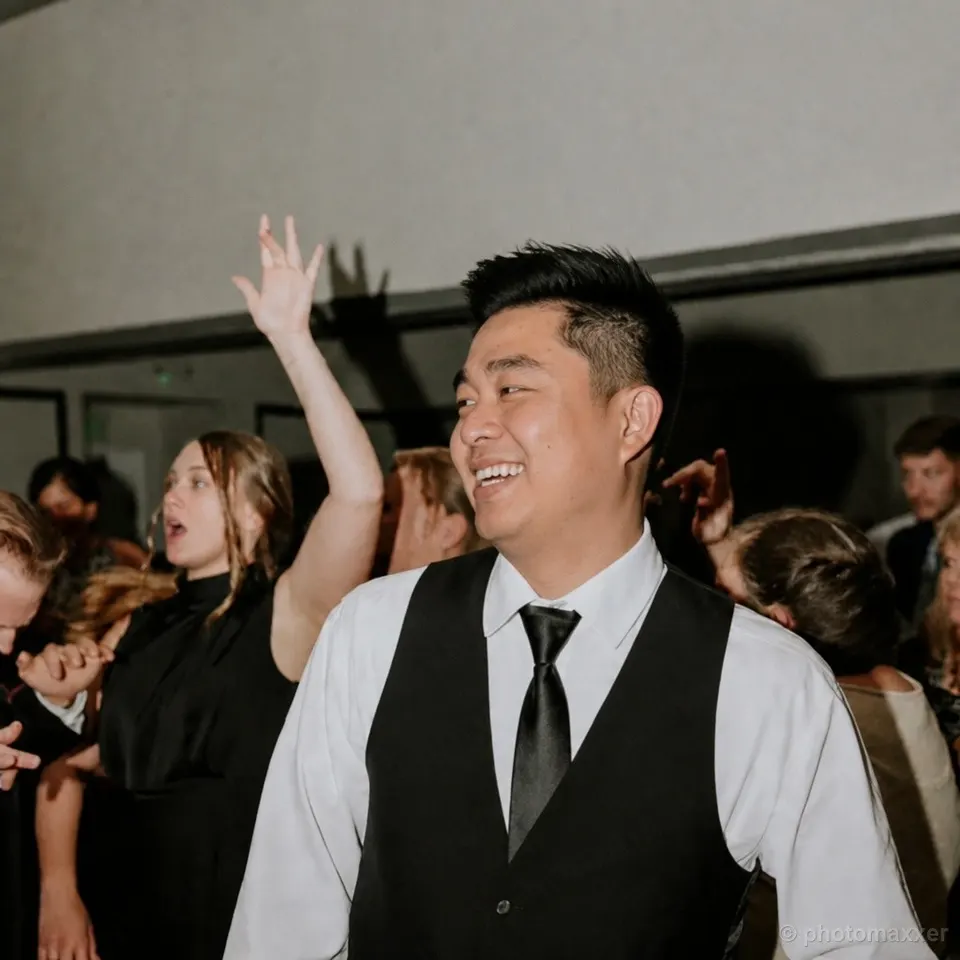

2. Give a friend a specific job
“Take a photo of me” often produces a stiff pose. Ask instead: “Get a few while I am talking to everyone. Keep the table and the people in.” For an activity, ask them to capture the action and the moments just before or afterward.
Keep doing something. Tell the story, adjust the board, talk to your friend, or react to what is happening. Take a short sequence so you can choose among expressions and moments. A small amount of movement is not automatically a reason to reject the strongest shot.
Ask for the original files afterward. That preserves your editing options, but do not confuse the file's resolution with the image's value. A technically imperfect photo with great social energy deserves a serious look. For specific requests you can use during an outing, see how to ask a friend to take dating photos.
3. Leave the useful context in the frame
Cropping tightly around your face can remove the reason the picture works. Keep the audience at the event, the water behind the boat, the people reacting to your joke, or the mountains around you.
The same principle applies to hats and sunglasses. Ski goggles, a cap on the golf course, or sunglasses on a boat belong to the activity. Do not discard a strong lifestyle photo just because it breaks a face-visibility rule.
4. Use a timer when nobody is available
Choose a setting that tells a story: preparing the barbecue, getting ready for a hike, or practicing a skill. Rest the phone on a stable support, leave room for the activity, and use a timer. Do several short sequences with a small action instead of holding one pose. Our tripod-photo guide walks through choosing a position, testing the frame and reviewing each short sequence.
Step back to show what is happening.
On iPhone, open Camera, tap the Camera Controls button or swipe up from the camera modes, then choose Timer → 10s. Tap the shutter and move into place. If needed, tap the intended subject area to focus and adjust exposure beside it. Apple's camera-tools guide describes the current controls.
Use those adjustments to capture the scene successfully. Do not spend the whole session perfecting a background blur while losing the activity that made the photo worth taking.
5. Select by the impression, then check the details
Already have a camera roll full of selfies? Our selfie selection guide helps you choose which ones add warmth, an interest or social context to your lineup.
- Read the lifestyle first. What does the scene suggest about spending time with you?
- Look at your role. Are you involved, comfortable, and part of what is happening?
- Compare the alternatives. Does another frame show more charm, energy, or connection?
- Check usability. Can the viewer understand the action at the size the app displays it?
- Choose variety. Keep the strongest photo from each repeated situation.
A blurry image that nobody can understand is unhelpful. A slightly imperfect image with an obvious, appealing story is a different case. Judge the whole result instead of rejecting it on a technical checklist.
Make your next outing do double duty
Choose one upcoming activity and one missing profile signal. Ask a friend before the event to help capture it. Your goal is a handful of useful options, not turning everyone else's day into a photoshoot.
Then build a lineup where each picture adds something. Our best dating photos guide explains the roles, and the full-body guide shows how to keep the person and the scene together.
Common questions
Do I need a professional photographer?
No. Start with friends and activities you already enjoy. A professional shoot is useful only if it captures the lifestyle and social context your profile needs.
Should I always face the camera?
No. Looking at another person or concentrating on an activity can make the moment stronger. Choose the interaction over an automatic camera-facing pose.
Is golden-hour lighting essential?
No. Take the useful moment when it happens. Light is a supporting tool, not the reason someone wants to join your life.
Method and source notes
The lifestyle-first approach is Photomaxxer's editorial guidance. Phone controls were checked against Apple's documentation on October 19, 2026.